Showing posts with label Continuous Integration. Show all posts

Monday, April 27, 2015

Jenkins: Zip files into email attachment and sent by notifier in Jenkins

Sometimes during CI testing using Jenkins, when the notifier sends an email to a recipient, the recipient may not be able to click the link in the notification email to go to view the content due to user privilege and authorization limit set on the user, but sometimes it is desirable for the user to view the output the the build details such as other files generated during the build even when user is not given the right to access the Jenkins server build detail page. In this case, the solution is to zip the content of the build and directly send as an attachment to the user. Below are some brief steps to do this (assuming we are working on the projet "HelloWorld"):

1. Install ArtifactDeployer plugin to jenkins
2. Install Email-ext to jenkins
3. Configure Email-ext in the "Configurate System" of "Manage Jenkins" and "Configure" of the project "HelloWorld"
4. Add "7za a -tzip deploy.zip "%WORKSPACE%\HelloWorld\HelloWorld\bin\Debug\*.*"" as a new "Execute Windows batch Command" in the build section of the project's "Configure"
5. Add "deploy.zip" in the files to archive as a new "Archive the artifact" post-build action in the project's "Configure"
6. Add "deploy.zip" in the attachment of the editable email notification as post-build action the project's "Configure"
7. Add send trigger for success in the editable email notification (in advanced)

If you set the smtp sever to something such as stmp.gmail.com, the email may be blocked, withe following messages in the build console output:

Error sending to the following VALID addresses: ---@----.com
SendFailedException message: 552-5.7.0 This message was blocked because its content presents a potential

This can be due to the zip attachment is not allow by that stmp settings.

Sunday, April 26, 2015

Jenkins: Fix errors in using MSBuild and MSTests plugin for building and test running C# project in Jenkins

Today I was trying to test run the CI of a C# project in Jenkins. To do this, i have installed the msbuild and mstest related plugins in Jenkins (MSBuild Plugin, MSTest Plugin, MSTestRunner Plugin) and restarted jenkins. However, after I added in a build step using option ''Build a Visual Studio project or solution using MSBuild'. I encountered build failure in which the console output from the build states that

'msbuild.exe' is not recognized as an internal or external command

The problem turns out that i did not have the msbuild in my Windows environment path. After I added in the "C:\Windows\Microsoft.NET\Framework\v4.0.30319" (which contains the command msbuild.exe) to my path, the build is successful.

Furthermore, also need to add the "C:\Program Files (x86)\Microsoft Visual Studio 11.0\Common7\IDE" (which contains mstest.exe) to the path, otherwise the MSTest plugin will throw error


Note that the above process sometimes may make mstests throw some errors such as the following:

ERROR: Build step failed with exception
java.lang.NullPointerException
 at org.jenkinsci.plugins.MsTestBuilder.perform(MsTestBuilder.java:151)
 at hudson.tasks.BuildStepMonitor$1.perform(BuildStepMonitor.java:20)
 at hudson.model.AbstractBuild$AbstractBuildExecution.perform(AbstractBuild.java:761)
 at hudson.model.Build$BuildExecution.build(Build.java:203)
 at hudson.model.Build$BuildExecution.doRun(Build.java:160)
 at hudson.model.AbstractBuild$AbstractBuildExecution.run(AbstractBuild.java:536)
 at hudson.model.Run.execute(Run.java:1741)
 at hudson.model.FreeStyleBuild.run(FreeStyleBuild.java:43)
 at hudson.model.ResourceController.execute(ResourceController.java:98)
 at hudson.model.Executor.run(Executor.java:374)
Build step 'Run unit tests with MSTest' marked build as failure
Finished: FAILURE

The better way can be done via jenkins, go to jenkins and click "Manage Jenkins" and then click "Configure Systems", Add a "MSBuild" and "MSTest" version there, and then add the paths of MSBuild and MSTest in your system to the "MSBuild" and "MSTests" section there (these are added by the MSBuild and MSTest plugins), As shown in the following screenshots


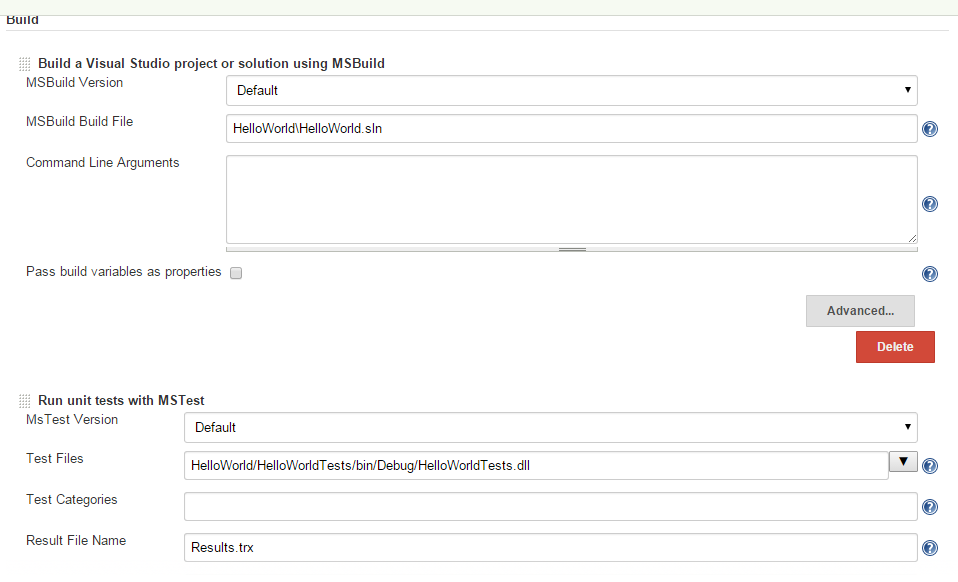
Then go back to your project and set the MSBuild version and MSTest version to the ones created in the "Configure Systems", as shown in the figure below:


After this step, you can remove MSBuild and MSTest from your system environment path variable, and restart your jenkins, and it will work.