This npm package provides JavaScript implementation of linear regression and logistic regression
Install
npm install js-regression
Usage
Linear Regression
The sample code below illustrates how to run the multiple linear regression (polynomial in this case):
var jsregression =require('js-regression');
// === training data generated from y = 2.0 + 5.0 * x + 2.0 * x^2 === //var data = [];
for(var x =1.0; x <100.0; x +=1.0) {
var y =2.0+5.0* x +2.0* x * x +Math.random() *1.0;
data.push([x, x * x, y]); // Note that the last column should be y the output
}
// === Create the linear regression === //var regression =newjsregression.LinearRegression({
alpha:0.001, //
iterations:300,
lambda:0.0
});
// can also use default configuration: var regression = new jsregression.LinearRegression(); // === Train the linear regression === //var model =regression.fit(data);
// === Print the trained model === //console.log(model);
// === Testing the trained linear regression === //var testingData = [];
for(var x =1.0; x <100.0; x +=1.0) {
var actual_y =2.0+5.0* x +2.0* x * x +Math.random() *1.0;
var predicted_y =regression.transform([x, x * x]);
console.log("actual: "+ actual_y +" predicted: "+ predicted_y);
}
Logistic Regression
The sample code below illustrates how to run the logistic regression on the iris datsets to classify whether a data row belong to species Iris-virginica:
var jsregression =require('js-regression');
var iris =require('js-datasets-iris');
// === Create the linear regression === //var logistic =newjsregression.LogisticRegression({
alpha:0.001,
iterations:1000,
lambda:0.0
});
// can also use default configuration: var logistic = new jsregression.LogisticRegression(); // === Create training data and testing data ===//iris.shuffle();
var trainingDataSize =Math.round(iris.rowCount*0.8);
var trainingData = [];
var testingData = [];
for(var i=0; i <iris.rowCount ; ++i) {
var row = [];
row.push(iris.data[i][0]); // sepalLength;row.push(iris.data[i][1]); // sepalWidth;row.push(iris.data[i][2]); // petalLength;row.push(iris.data[i][3]); // petalWidth;row.push(iris.data[i][4] =="Iris-virginica"?1.0:0.0); // output which is 1 if species is Iris-virginica; 0 otherwiseif(i < trainingDataSize) {
trainingData.push(row);
} else {
testingData.push(row);
}
}
// === Train the logistic regression === //var model =logistic.fit(trainingData);
// === Print the trained model === //console.log(model);
// === Testing the trained logistic regression === //for(var i=0; i <testingData.length; ++i){
var probabilityOfSpeciesBeingIrisVirginica =logistic.transform(testingData[i]);
var predicted =logistic.transform(testingData[i]) >=logistic.threshold?1:0;
console.log("actual: "+ testingData[i][4] +" probability of being Iris-virginica: "+ probabilityOfSpeciesBeingIrisVirginica);
console.log("actual: "+ testingData[i][4] +" predicted: "+ predicted);
}
Multi-Class Classification using One-vs-All Logistic Regression
The sample code below illustrates how to run the multi-class classifier on the iris datasets to classifiy the species of each data row:
var classifier =newjsregression.MultiClassLogistic({
alpha:0.001,
iterations:1000,
lambda:0.0
});
iris.shuffle();
var trainingDataSize =Math.round(iris.rowCount*0.9);
var trainingData = [];
var testingData = [];
for(var i=0; i <iris.rowCount ; ++i) {
var row = [];
row.push(iris.data[i][0]); // sepalLength;row.push(iris.data[i][1]); // sepalWidth;row.push(iris.data[i][2]); // petalLength;row.push(iris.data[i][3]); // petalWidth;row.push(iris.data[i][4]); // output is speciesif(i < trainingDataSize){
trainingData.push(row);
} else {
testingData.push(row);
}
}
var result =classifier.fit(trainingData);
console.log(result);
for(var i=0; i <testingData.length; ++i){
var predicted =classifier.transform(testingData[i]);
console.log("actual: "+ testingData[i][4] +" predicted: "+ predicted);
}
Usage In HTML
Include the "node_modules/js-regression/build/jsregression.min.js" (or "node_modules/js-regression/src/jsregression.js") in your HTML <script> tag
The code in the script tag looks sth like this:
var logistic =newjsregression.LogisticRegression();
I used to look for a libsvm written in pure Java, but the solutions found are not very satisfactory, and ended up making one myself. I have recently release the implementation and make it available in github.
The code above create a data frame which has the following columns
livch1 (input): value = 1 if the "livch" column of the CSV contains value 1 ; 0 otherwise
livch2 (input): value = 1 if the "livch" column of the CSV contains value 2 ; 0 otherwise
livch3 (input): value = 1 if the "livch" column of the CSV contains value 3+ ; 0 otherwise
age (input): value = numeric value in the "age" column of the CSV
age^2 (input): value = square of numeric value in the "age" column of the CSV
urban (input): value = 1 if the "urban" column of the CSV has value "Y" ; 0 otherwise
use (output): value = 1 if the "use" column of the CSV has value "Y" ; 0 otherwise
Currently csv files and the libsvm format are supported for creating data frame, to load a libsvm-format file, call "DataQuery.libsvm()" instead of "DataQuery.csv(..)".
In the future more option will be added for the supported format
One-class SVM
Below is the code to create and train a one-class SVM:
Below is the code to perform multi-class classification:
algorithm.classify(data_point)
Data Format
The data format default is the DataFrame class, which can be used to load csv and libsvm format text file. Please refers to the unit test cases on how they can be used.
Sample codes
Sample code for OneClassSVM:
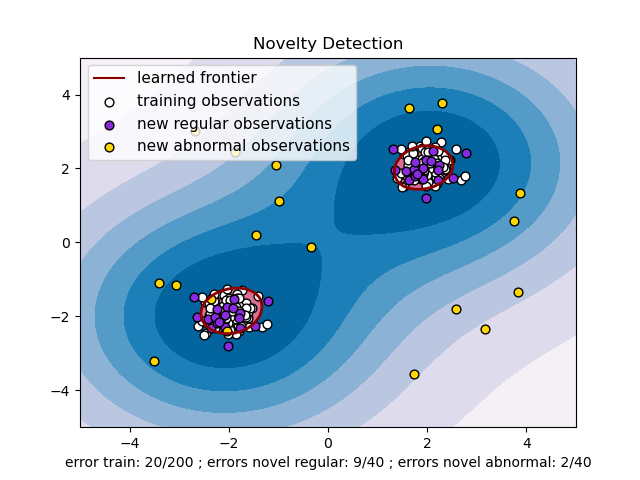
Below is a sample code example of the one-class SVM for the example below here: