Showing posts with label Support Vector Machine. Show all posts

Thursday, May 25, 2017

Open Source: JavaScript implementation of Linear and Kernel SVM using Gradient Descent

js-svm

This package provides javascript implementation of linear SVM and SVM with gaussian kernel:

Features

  • Support for binary classification
  • Support for multi-class classification

Install

npm install js-svm

Usage

SVM Binary Classifier

The sample code below show how to use SVM binary classifier on the iris datsets to classify whether a data row belong to species Iris-virginica:
var jssvm = require('js-svm');
var iris = require('js-datasets-iris');

var svm = new jssvm.BinarySvmClassifier();

iris.shuffle();

var trainingDataSize = Math.round(iris.rowCount * 0.9);
var trainingData = [];
var testingData = [];
for(var i=0; i < iris.rowCount ; ++i) {
   var row = [];
   row.push(iris.data[i][0]); // sepalLength;
   row.push(iris.data[i][1]); // sepalWidth;
   row.push(iris.data[i][2]); // petalLength;
   row.push(iris.data[i][3]); // petalWidth;
   row.push(iris.data[i][4] == "Iris-virginica" ? 1.0 : 0.0); // output which is 1 if species is Iris-virginica; 0 otherwise
   if(i < trainingDataSize){
        trainingData.push(row);
   } else {
       testingData.push(row);
   }
}


var result = svm.fit(trainingData);

console.log(result);

for(var i=0; i < testingData.length; ++i){
   var predicted = svm.transform(testingData[i]);
   console.log("actual: " + testingData[i][4] + " predicted: " + predicted);
}
To configure the BinarySvmClassifier, use the following code when it is created:
var svm = new jssvm.BinarySvmClassifier({
   alpha: 0.01, // learning rate
   iterations: 1000, // maximum iterations
   C: 5.0, // panelty term
   trace: false // debug tracing
});

Multi-Class Classification using One-vs-All Logistic Regression

The sample code below illustrates how to run the multi-class classifier on the iris datasets to classifiy the species of each data row:
var jssvm = require('js-svm');
var iris = require('js-datasets-iris');

var classifier = new jssvm.MultiClassSvmClassifier();

iris.shuffle();

var trainingDataSize = Math.round(iris.rowCount * 0.9);
var trainingData = [];
var testingData = [];
for(var i=0; i < iris.rowCount ; ++i) {
   var row = [];
   row.push(iris.data[i][0]); // sepalLength;
   row.push(iris.data[i][1]); // sepalWidth;
   row.push(iris.data[i][2]); // petalLength;
   row.push(iris.data[i][3]); // petalWidth;
   row.push(iris.data[i][4]); // output is species
   if(i < trainingDataSize){
        trainingData.push(row);
   } else {
       testingData.push(row);
   }
}


var result = classifier.fit(trainingData);

console.log(result);

for(var i=0; i < testingData.length; ++i){
   var predicted = classifier.transform(testingData[i]);
   console.log("svm prediction testing: actual: " + testingData[i][4] + " predicted: " + predicted);
}
To configure the MultiClassSvmClassifier, use the following code when it is created:
var classifier = new jssvm.MultiClassSvmClassifier({
   alpha: 0.01, // learning rate
   iterations: 1000, // maximum iterations
   C: 5.0 // panelty term
   sigma: 1.0 // the standard deviation for the gaussian kernel
});

Switch between linear and guassian kernel

By default the kernel used by the binary and multi-class classifier is "linear" which can be printed by:
console.log(classifier.kernel);
To switch to use gaussian kernel, put the property 'kernel: "gaussian"' in the config data when the classifier is created:
var svm = new jssvm.BinarySvmClassifier({
   ...,
   kernel: 'gaussian'
});

....

var svm = new jssvm.MultiClassSvmClassifier({
   ...,
   kernel: 'gaussian'
});

Usage In HTML

Include the "node_modules/js-svm/build/jssvm.min.js" (or "node_modules/js-svm/src/jssvm.js") in your HTML <script> tag
The code in the script tag looks sth like this:
var classifier = new jssvm.BinarySvmClassifier();

Saturday, May 6, 2017

Open Source: libsvm with fluent API in Java

I used to look for a libsvm written in pure Java, but the solutions found are not very satisfactory, and ended up making one myself. I have recently release the implementation and make it available in github. 

https://github.com/chen0040/java-libsvm

Below are some features and code sample of the package:

Install

Add the following dependency to your POM file:
<dependency>
  <groupId>com.github.chen0040</groupId>
  <artifactId>java-libsvm</artifactId>
  <version>1.0.1</version>
</dependency>

Usage

Load Data

Suppose you have a csv file named contraception.csv that has the following file format:
"","woman","district","use","livch","age","urban"
"1","1","1","N","3+",18.44,"Y"
"2","2","1","N","0",-5.5599,"Y"
"3","3","1","N","2",1.44,"Y"
"4","4","1","N","3+",8.44,"Y"
"5","5","1","N","0",-13.559,"Y"
"6","6","1","N","0",-11.56,"Y"
An example of java code to create a data frame from the above CSV file:
import com.github.chen0040.glm.data.DataFrame;
import com.github.chen0040.glm.data.DataQuery;
import com.github.chen0040.glm.utils.StringUtils;

int column_use = 3;
int column_livch = 4;
int column_age = 5;
int column_urban = 6;
boolean skipFirstLine = true;
String columnSplitter = ",";
InputStream inputStream = new FileInputStream("contraception.csv");
DataFrame frame = DataQuery.csv(columnSplitter, skipFirstLine)
        .from(inputStream)
        .selectColumn(column_livch).transform(cell -> cell.equals("1") ? 1.0 : 0.0).asInput("livch1")
        .selectColumn(column_livch).transform(cell -> cell.equals("2") ? 1.0 : 0.0).asInput("livch2")
        .selectColumn(column_livch).transform(cell -> cell.equals("3+") ? 1.0 : 0.0).asInput("livch3")
        .selectColumn(column_age).asInput("age")
        .selectColumn(column_age).transform(cell -> Math.pow(StringUtils.parseDouble(cell), 2)).asInput("age^2")
        .selectColumn(column_urban).transform(cell -> cell.equals("Y") ? 1.0 : 0.0).asInput("urban")
        .selectColumn(column_use).transform(cell -> cell.equals("Y") ? 1.0 : 0.0).asOutput("use")
        .build();
The code above create a data frame which has the following columns
  • livch1 (input): value = 1 if the "livch" column of the CSV contains value 1 ; 0 otherwise
  • livch2 (input): value = 1 if the "livch" column of the CSV contains value 2 ; 0 otherwise
  • livch3 (input): value = 1 if the "livch" column of the CSV contains value 3+ ; 0 otherwise
  • age (input): value = numeric value in the "age" column of the CSV
  • age^2 (input): value = square of numeric value in the "age" column of the CSV
  • urban (input): value = 1 if the "urban" column of the CSV has value "Y" ; 0 otherwise
  • use (output): value = 1 if the "use" column of the CSV has value "Y" ; 0 otherwise
Currently csv files and the libsvm format are supported for creating data frame, to load a libsvm-format file, call "DataQuery.libsvm()" instead of "DataQuery.csv(..)".
In the future more option will be added for the supported format

One-class SVM

Below is the code to create and train a one-class SVM:
OneClassSVM algorithm = new OneClassSVM();
algorithm.fit(training_data)
Below is the code to predict if data point is an outlier:
algorithm.isAnomaly(data_point)

SVR

Below is the code to create and train a SVR for regression modelling:
SVR algorithm = new SVR();
algorithm.fit(training_data)
Below is the code to perform data regression prediction:
algorithm.isAnomaly(data_point)

BinarySVC

Below is the code to create and train a BinarySVC for binary classification:
BinarySVC algorithm = new BinarySVC();
algorithm.fit(training_data)
Below is the code to perform data binary classification:
algorithm.isInClass(data_point)

OneVsOneSVC

Below is the code to create and train a OneVsOneSVC for multi-class classification:
BinarySVC algorithm = new BinarySVC();
algorithm.fit(training_data)
Below is the code to perform multi-class classification:
algorithm.classify(data_point)

Data Format

The data format default is the DataFrame class, which can be used to load csv and libsvm format text file. Please refers to the unit test cases on how they can be used.

Sample codes

Sample code for OneClassSVM:

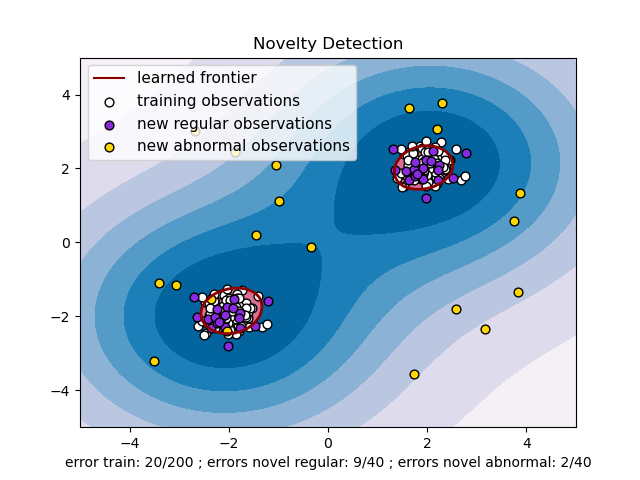
Below is a sample code example of the one-class SVM for the example below here:
scki-learn example for one-class
import com.github.chen0040.svmext.data.DataFrame;
import com.github.chen0040.svmext.data.DataQuery;
import com.github.chen0040.svmext.data.Sampler;
import com.github.chen0040.svmext.oneclass.OneClassSVM;

DataQuery.DataFrameQueryBuilder schema = DataQuery.blank()
      .newInput("c1")
      .newInput("c2")
      .newOutput("anomaly")
      .end();

Sampler.DataSampleBuilder negativeSampler = new Sampler()
      .forColumn("c1").generate((name, index) -> randn() * 0.3 + (index % 2 == 0 ? -2 : 2))
      .forColumn("c2").generate((name, index) -> randn() * 0.3 + (index % 2 == 0 ? -2 : 2))
      .forColumn("anomaly").generate((name, index) -> 0.0)
      .end();

Sampler.DataSampleBuilder positiveSampler = new Sampler()
      .forColumn("c1").generate((name, index) -> rand(-4, 4))
      .forColumn("c2").generate((name, index) -> rand(-4, 4))
      .forColumn("anomaly").generate((name, index) -> 1.0)
      .end();

DataFrame trainingData = schema.build();

trainingData = negativeSampler.sample(trainingData, 200);

System.out.println(trainingData.head(10));

DataFrame crossValidationData = schema.build();

crossValidationData = negativeSampler.sample(crossValidationData, 40);

DataFrame outliers = schema.build();

outliers = positiveSampler.sample(outliers, 40);

final double threshold = 0.5;
OneClassSVM algorithm = new OneClassSVM();
algorithm.set_gamma(0.1);
algorithm.set_nu(0.1);
algorithm.thresholdSupplier = () -> 0.0;

algorithm.fit(trainingData);

for(int i = 0; i < crossValidationData.rowCount(); ++i){
 boolean predicted = algorithm.isAnomaly(crossValidationData.row(i));
 logger.info("predicted: {}\texpected: {}", predicted, crossValidationData.row(i).target() > threshold);
}

for(int i = 0; i < outliers.rowCount(); ++i){
 boolean predicted = algorithm.isAnomaly(outliers.row(i));
 logger.info("outlier predicted: {}\texpected: {}", predicted, outliers.row(i).target() > threshold);
}

Sample codes for SVR

Below is another complete sample code of the SVR to predict y = 4 + 0.5 * x1 + 0.2 * x2:
sample image for regression
import com.github.chen0040.svmext.data.DataFrame;
import com.github.chen0040.svmext.data.DataQuery;
import com.github.chen0040.svmext.data.Sampler;
import com.github.chen0040.svmext.oneclass.SVR;

DataQuery.DataFrameQueryBuilder schema = DataQuery.blank()
      .newInput("x1")
      .newInput("x2")
      .newOutput("y")
      .end();

// y = 4 + 0.5 * x1 + 0.2 * x2
Sampler.DataSampleBuilder sampler = new Sampler()
      .forColumn("x1").generate((name, index) -> randn() * 0.3 + index)
      .forColumn("x2").generate((name, index) -> randn() * 0.3 + index * index)
      .forColumn("y").generate((name, index) -> 4 + 0.5 * index + 0.2 * index * index + randn() * 0.3)
      .end();

DataFrame trainingData = schema.build();

trainingData = sampler.sample(trainingData, 200);

System.out.println(trainingData.head(10));

DataFrame crossValidationData = schema.build();

crossValidationData = sampler.sample(crossValidationData, 40);

SVR svr = new SVR();
svr.fit(trainingData);

for(int i = 0; i < crossValidationData.rowCount(); ++i){
 double predicted = svr.transform(crossValidationData.row(i));
 double actual = crossValidationData.row(i).target();
 System.out.println("predicted: " + predicted + "\texpected: " + actual);
}

Sample code for BinarySVC

Below is another complete sample code of the BinarySVC for binary classification:
import com.github.chen0040.svmext.data.DataFrame;
import com.github.chen0040.svmext.data.DataQuery;
import com.github.chen0040.svmext.data.Sampler;
import com.github.chen0040.svmext.classifiers.BinarySVC;

DataQuery.DataFrameQueryBuilder schema = DataQuery.blank()
      .newInput("c1")
      .newInput("c2")
      .newOutput("anomaly")
      .end();

Sampler.DataSampleBuilder negativeSampler = new Sampler()
      .forColumn("c1").generate((name, index) -> randn() * 0.3 + (index % 2 == 0 ? -2 : 2))
      .forColumn("c2").generate((name, index) -> randn() * 0.3 + (index % 2 == 0 ? -2 : 2))
      .forColumn("anomaly").generate((name, index) -> 0.0)
      .end();

Sampler.DataSampleBuilder positiveSampler = new Sampler()
      .forColumn("c1").generate((name, index) -> rand(-4, 4))
      .forColumn("c2").generate((name, index) -> rand(-4, 4))
      .forColumn("anomaly").generate((name, index) -> 1.0)
      .end();

DataFrame trainingData = schema.build();

trainingData = negativeSampler.sample(trainingData, 200);
trainingData = positiveSampler.sample(trainingData, 200);

System.out.println(trainingData.head(10));

DataFrame crossValidationData = schema.build();

crossValidationData = negativeSampler.sample(crossValidationData, 40);
crossValidationData = positiveSampler.sample(crossValidationData, 40);

BinarySVC algorithm = new BinarySVC();
algorithm.fit(trainingData);

BinaryClassifierEvaluator evaluator = new BinaryClassifierEvaluator();

for(int i = 0; i < crossValidationData.rowCount(); ++i){
 boolean predicted = algorithm.isInClass(crossValidationData.row(i));
 boolean actual = crossValidationData.row(i).target() > 0.5;
 evaluator.evaluate(actual, predicted);
 System.out.println("predicted: " + predicted + "\texpected: " + actual);
}

evaluator.report();

Sample codes for OneVsOneSVC

Below is another complete sample code of the OneVsOneSVC for multi-class classification:
import com.github.chen0040.svmext.data.DataFrame;
import com.github.chen0040.svmext.data.DataQuery;
import com.github.chen0040.svmext.data.Sampler;
import com.github.chen0040.svmext.classifiers.OneVsOneSVC;

InputStream irisStream = new FileInputStream("iris.data");
DataFrame irisData = DataQuery.csv(",", false)
      .from(irisStream)
      .selectColumn(0).asInput("Sepal Length")
      .selectColumn(1).asInput("Sepal Width")
      .selectColumn(2).asInput("Petal Length")
      .selectColumn(3).asInput("Petal Width")
      .selectColumn(4).transform(label -> label).asOutput("Iris Type")
      .build();

TupleTwo<DataFrame, DataFrame> parts = irisData.shuffle().split(0.9);

DataFrame trainingData = parts._1();
DataFrame crossValidationData = parts._2();

System.out.println(crossValidationData.head(10));

OneVsOneSVC multiClassClassifier = new OneVsOneSVC();
multiClassClassifier.fit(trainingData);

ClassifierEvaluator evaluator = new ClassifierEvaluator();

for(int i=0; i < crossValidationData.rowCount(); ++i) {
 String predicted = multiClassClassifier.classify(crossValidationData.row(i));
 String actual = crossValidationData.row(i).categoricalTarget();
 System.out.println("predicted: " + predicted + "\tactual: " + actual);
 evaluator.evaluate(actual, predicted);
}

evaluator.report();