Saturday, May 6, 2017

Open Source: Classical Reinforcement Learning in Java

I have just released a java package that implements the classical reinforcement learning introduced by Sutton's book "Reinforcement Learning: An Introduction", it is available at:

The package is available in maven repository as well. Some features and sample codes on usage are described here:

https://github.com/chen0040/java-reinforcement-learning

Features

The following reinforcement learning are implemented:
  • R-Learn
  • Q-Learn
  • Q-Learn with eligibility trace
  • SARSA
  • SARSA with eligibility trace
  • Actor-Critic
  • Actor-Critic with eligibility trace
The package also support a number of action-selection strategy:
  • soft-max
  • epsilon-greedy
  • greedy
  • Gibbs-soft-max
Reinforcement Learning

Install

Add the following dependency to your POM file:
<dependency>
  <groupId>com.github.chen0040</groupId>
  <artifactId>java-reinforcement-learning</artifactId>
  <version>1.0.1</version>
</dependency>

Usage

Create Agent

An reinforcement agent, say, Q-Learn agent, can be created by the following java code:
import com.github.chen0040.rl.learning.qlearn.QAgent;

int stateCount = 100;
int actionCount = 10;
QAgent agent = new QAgent(stateCount, actionCount);
The agent created has a state map of 100 states, and 10 different actions for its selection.
For Q-Learn and SARSA, the eligibility trace lambda can be enabled by calling:
agent.enableEligibilityTrace(lambda)

Select Action

At each time step, a action can be selected by the agent, by calling:
int actionId = agent.selectAction();
If you want to limits the number of possible action at each states (say the problem restrict the actions avaliable at different state), then call:
Set<Integer> actionsAvailableAtCurrentState = world.getActionsAvailable(agent);
int actionTaken = agent.selectAction(actionsAvailableAtCurrentState);
The agent can also change to a different action-selection policy available in com.github.chen0040.rl.actionselection package, for example, the following code switch the action selection policy to soft-max:
agent.getLearner().setActionSelection(SoftMaxActionSelectionStrategy.class.getCanonicalName());

State-Action Update

Once the world state has been updated due to the agent's selected action, its internal state-action Q matrix will be updated by calling:
int newStateId = world.update(agent, actionTaken);
double reward = world.reward(agent);

agent.update(actionTaken, newStateId, reward);

Sample code

Sample code for R-Learn

import com.github.chen0040.rl.learning.rlearn.RAgent;

int stateCount = 100;
int actionCount = 10;
RAgent agent = new RAgent(stateCount, actionCount);

Random random = new Random();
agent.start(random.nextInt(stateCount));
for(int time=0; time < 1000; ++time){

 int actionId = agent.selectAction();
 System.out.println("Agent does action-"+actionId);
 
 int newStateId = world.update(agent, actionId);
 double reward = world.reward(agent);

 System.out.println("Now the new state is " + newStateId);
 System.out.println("Agent receives Reward = "+reward);

 agent.update(actionId, newStateId, reward);
}

Sample code for Q-Learn

import com.github.chen0040.rl.learning.qlearn.QAgent;

int stateCount = 100;
int actionCount = 10;
QAgent agent = new QAgent(stateCount, actionCount);

Random random = new Random();
agent.start(random.nextInt(stateCount));
for(int time=0; time < 1000; ++time){

 int actionId = agent.selectAction();
 System.out.println("Agent does action-"+actionId);
 
 int newStateId = world.update(agent, actionId);
 double reward = world.reward(agent);

 System.out.println("Now the new state is " + newStateId);
 System.out.println("Agent receives Reward = "+reward);

 agent.update(actionId, newStateId, reward);
}

Sample code for SARSA

import com.github.chen0040.rl.learning.sarsa.SarsaAgent;

int stateCount = 100;
int actionCount = 10;
SarsaAgent agent = new SarsaAgent(stateCount, actionCount);

Random random = new Random();
agent.start(random.nextInt(stateCount));
for(int time=0; time < 1000; ++time){

 int actionId = agent.selectAction();
 System.out.println("Agent does action-"+actionId);
 
 int newStateId = world.update(agent, actionId);
 double reward = world.reward(agent);

 System.out.println("Now the new state is " + newStateId);
 System.out.println("Agent receives Reward = "+reward);

 agent.update(actionId, newStateId, reward);
}

Sample code for Actor Critic Model

import com.github.chen0040.rl.learning.actorcritic.ActorCriticAgent;
import com.github.chen0040.rl.utils.Vec;

int stateCount = 100;
int actionCount = 10;
ActorCriticAgent agent = new ActorCriticAgent(stateCount, actionCount);
Vec stateValues = new Vec(stateCount);

Random random = new Random();
agent.start(random.nextInt(stateCount));
for(int time=0; time < 1000; ++time){

 int actionId = agent.selectAction();
 System.out.println("Agent does action-"+actionId);
 
 int newStateId = world.update(agent, actionId);
 double reward = world.reward(agent);

 System.out.println("Now the new state is " + newStateId);
 System.out.println("Agent receives Reward = "+reward);

 
 System.out.println("World state values changed ...");
 for(int stateId = 0; stateId < stateCount; ++stateId){
    stateValues.set(stateId, random.nextDouble());
 }
    
 agent.update(actionId, newStateId, reward, stateValues);
}

Open Source: libsvm with fluent API in Java

I used to look for a libsvm written in pure Java, but the solutions found are not very satisfactory, and ended up making one myself. I have recently release the implementation and make it available in github. 

https://github.com/chen0040/java-libsvm

Below are some features and code sample of the package:

Install

Add the following dependency to your POM file:
<dependency>
  <groupId>com.github.chen0040</groupId>
  <artifactId>java-libsvm</artifactId>
  <version>1.0.1</version>
</dependency>

Usage

Load Data

Suppose you have a csv file named contraception.csv that has the following file format:
"","woman","district","use","livch","age","urban"
"1","1","1","N","3+",18.44,"Y"
"2","2","1","N","0",-5.5599,"Y"
"3","3","1","N","2",1.44,"Y"
"4","4","1","N","3+",8.44,"Y"
"5","5","1","N","0",-13.559,"Y"
"6","6","1","N","0",-11.56,"Y"
An example of java code to create a data frame from the above CSV file:
import com.github.chen0040.glm.data.DataFrame;
import com.github.chen0040.glm.data.DataQuery;
import com.github.chen0040.glm.utils.StringUtils;

int column_use = 3;
int column_livch = 4;
int column_age = 5;
int column_urban = 6;
boolean skipFirstLine = true;
String columnSplitter = ",";
InputStream inputStream = new FileInputStream("contraception.csv");
DataFrame frame = DataQuery.csv(columnSplitter, skipFirstLine)
        .from(inputStream)
        .selectColumn(column_livch).transform(cell -> cell.equals("1") ? 1.0 : 0.0).asInput("livch1")
        .selectColumn(column_livch).transform(cell -> cell.equals("2") ? 1.0 : 0.0).asInput("livch2")
        .selectColumn(column_livch).transform(cell -> cell.equals("3+") ? 1.0 : 0.0).asInput("livch3")
        .selectColumn(column_age).asInput("age")
        .selectColumn(column_age).transform(cell -> Math.pow(StringUtils.parseDouble(cell), 2)).asInput("age^2")
        .selectColumn(column_urban).transform(cell -> cell.equals("Y") ? 1.0 : 0.0).asInput("urban")
        .selectColumn(column_use).transform(cell -> cell.equals("Y") ? 1.0 : 0.0).asOutput("use")
        .build();
The code above create a data frame which has the following columns
  • livch1 (input): value = 1 if the "livch" column of the CSV contains value 1 ; 0 otherwise
  • livch2 (input): value = 1 if the "livch" column of the CSV contains value 2 ; 0 otherwise
  • livch3 (input): value = 1 if the "livch" column of the CSV contains value 3+ ; 0 otherwise
  • age (input): value = numeric value in the "age" column of the CSV
  • age^2 (input): value = square of numeric value in the "age" column of the CSV
  • urban (input): value = 1 if the "urban" column of the CSV has value "Y" ; 0 otherwise
  • use (output): value = 1 if the "use" column of the CSV has value "Y" ; 0 otherwise
Currently csv files and the libsvm format are supported for creating data frame, to load a libsvm-format file, call "DataQuery.libsvm()" instead of "DataQuery.csv(..)".
In the future more option will be added for the supported format

One-class SVM

Below is the code to create and train a one-class SVM:
OneClassSVM algorithm = new OneClassSVM();
algorithm.fit(training_data)
Below is the code to predict if data point is an outlier:
algorithm.isAnomaly(data_point)

SVR

Below is the code to create and train a SVR for regression modelling:
SVR algorithm = new SVR();
algorithm.fit(training_data)
Below is the code to perform data regression prediction:
algorithm.isAnomaly(data_point)

BinarySVC

Below is the code to create and train a BinarySVC for binary classification:
BinarySVC algorithm = new BinarySVC();
algorithm.fit(training_data)
Below is the code to perform data binary classification:
algorithm.isInClass(data_point)

OneVsOneSVC

Below is the code to create and train a OneVsOneSVC for multi-class classification:
BinarySVC algorithm = new BinarySVC();
algorithm.fit(training_data)
Below is the code to perform multi-class classification:
algorithm.classify(data_point)

Data Format

The data format default is the DataFrame class, which can be used to load csv and libsvm format text file. Please refers to the unit test cases on how they can be used.

Sample codes

Sample code for OneClassSVM:

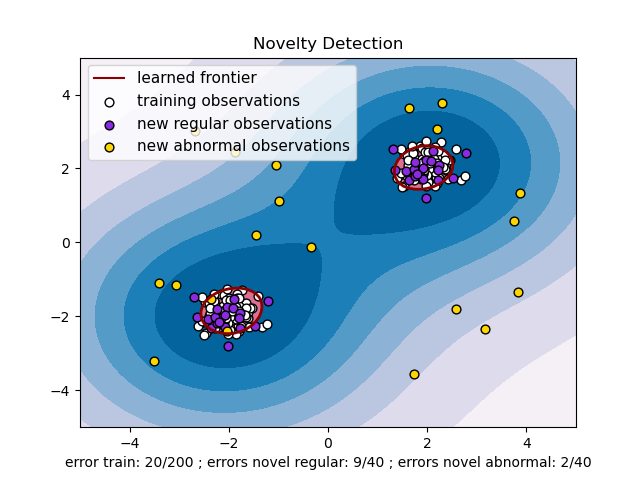
Below is a sample code example of the one-class SVM for the example below here:
scki-learn example for one-class
import com.github.chen0040.svmext.data.DataFrame;
import com.github.chen0040.svmext.data.DataQuery;
import com.github.chen0040.svmext.data.Sampler;
import com.github.chen0040.svmext.oneclass.OneClassSVM;

DataQuery.DataFrameQueryBuilder schema = DataQuery.blank()
      .newInput("c1")
      .newInput("c2")
      .newOutput("anomaly")
      .end();

Sampler.DataSampleBuilder negativeSampler = new Sampler()
      .forColumn("c1").generate((name, index) -> randn() * 0.3 + (index % 2 == 0 ? -2 : 2))
      .forColumn("c2").generate((name, index) -> randn() * 0.3 + (index % 2 == 0 ? -2 : 2))
      .forColumn("anomaly").generate((name, index) -> 0.0)
      .end();

Sampler.DataSampleBuilder positiveSampler = new Sampler()
      .forColumn("c1").generate((name, index) -> rand(-4, 4))
      .forColumn("c2").generate((name, index) -> rand(-4, 4))
      .forColumn("anomaly").generate((name, index) -> 1.0)
      .end();

DataFrame trainingData = schema.build();

trainingData = negativeSampler.sample(trainingData, 200);

System.out.println(trainingData.head(10));

DataFrame crossValidationData = schema.build();

crossValidationData = negativeSampler.sample(crossValidationData, 40);

DataFrame outliers = schema.build();

outliers = positiveSampler.sample(outliers, 40);

final double threshold = 0.5;
OneClassSVM algorithm = new OneClassSVM();
algorithm.set_gamma(0.1);
algorithm.set_nu(0.1);
algorithm.thresholdSupplier = () -> 0.0;

algorithm.fit(trainingData);

for(int i = 0; i < crossValidationData.rowCount(); ++i){
 boolean predicted = algorithm.isAnomaly(crossValidationData.row(i));
 logger.info("predicted: {}\texpected: {}", predicted, crossValidationData.row(i).target() > threshold);
}

for(int i = 0; i < outliers.rowCount(); ++i){
 boolean predicted = algorithm.isAnomaly(outliers.row(i));
 logger.info("outlier predicted: {}\texpected: {}", predicted, outliers.row(i).target() > threshold);
}

Sample codes for SVR

Below is another complete sample code of the SVR to predict y = 4 + 0.5 * x1 + 0.2 * x2:
sample image for regression
import com.github.chen0040.svmext.data.DataFrame;
import com.github.chen0040.svmext.data.DataQuery;
import com.github.chen0040.svmext.data.Sampler;
import com.github.chen0040.svmext.oneclass.SVR;

DataQuery.DataFrameQueryBuilder schema = DataQuery.blank()
      .newInput("x1")
      .newInput("x2")
      .newOutput("y")
      .end();

// y = 4 + 0.5 * x1 + 0.2 * x2
Sampler.DataSampleBuilder sampler = new Sampler()
      .forColumn("x1").generate((name, index) -> randn() * 0.3 + index)
      .forColumn("x2").generate((name, index) -> randn() * 0.3 + index * index)
      .forColumn("y").generate((name, index) -> 4 + 0.5 * index + 0.2 * index * index + randn() * 0.3)
      .end();

DataFrame trainingData = schema.build();

trainingData = sampler.sample(trainingData, 200);

System.out.println(trainingData.head(10));

DataFrame crossValidationData = schema.build();

crossValidationData = sampler.sample(crossValidationData, 40);

SVR svr = new SVR();
svr.fit(trainingData);

for(int i = 0; i < crossValidationData.rowCount(); ++i){
 double predicted = svr.transform(crossValidationData.row(i));
 double actual = crossValidationData.row(i).target();
 System.out.println("predicted: " + predicted + "\texpected: " + actual);
}

Sample code for BinarySVC

Below is another complete sample code of the BinarySVC for binary classification:
import com.github.chen0040.svmext.data.DataFrame;
import com.github.chen0040.svmext.data.DataQuery;
import com.github.chen0040.svmext.data.Sampler;
import com.github.chen0040.svmext.classifiers.BinarySVC;

DataQuery.DataFrameQueryBuilder schema = DataQuery.blank()
      .newInput("c1")
      .newInput("c2")
      .newOutput("anomaly")
      .end();

Sampler.DataSampleBuilder negativeSampler = new Sampler()
      .forColumn("c1").generate((name, index) -> randn() * 0.3 + (index % 2 == 0 ? -2 : 2))
      .forColumn("c2").generate((name, index) -> randn() * 0.3 + (index % 2 == 0 ? -2 : 2))
      .forColumn("anomaly").generate((name, index) -> 0.0)
      .end();

Sampler.DataSampleBuilder positiveSampler = new Sampler()
      .forColumn("c1").generate((name, index) -> rand(-4, 4))
      .forColumn("c2").generate((name, index) -> rand(-4, 4))
      .forColumn("anomaly").generate((name, index) -> 1.0)
      .end();

DataFrame trainingData = schema.build();

trainingData = negativeSampler.sample(trainingData, 200);
trainingData = positiveSampler.sample(trainingData, 200);

System.out.println(trainingData.head(10));

DataFrame crossValidationData = schema.build();

crossValidationData = negativeSampler.sample(crossValidationData, 40);
crossValidationData = positiveSampler.sample(crossValidationData, 40);

BinarySVC algorithm = new BinarySVC();
algorithm.fit(trainingData);

BinaryClassifierEvaluator evaluator = new BinaryClassifierEvaluator();

for(int i = 0; i < crossValidationData.rowCount(); ++i){
 boolean predicted = algorithm.isInClass(crossValidationData.row(i));
 boolean actual = crossValidationData.row(i).target() > 0.5;
 evaluator.evaluate(actual, predicted);
 System.out.println("predicted: " + predicted + "\texpected: " + actual);
}

evaluator.report();

Sample codes for OneVsOneSVC

Below is another complete sample code of the OneVsOneSVC for multi-class classification:
import com.github.chen0040.svmext.data.DataFrame;
import com.github.chen0040.svmext.data.DataQuery;
import com.github.chen0040.svmext.data.Sampler;
import com.github.chen0040.svmext.classifiers.OneVsOneSVC;

InputStream irisStream = new FileInputStream("iris.data");
DataFrame irisData = DataQuery.csv(",", false)
      .from(irisStream)
      .selectColumn(0).asInput("Sepal Length")
      .selectColumn(1).asInput("Sepal Width")
      .selectColumn(2).asInput("Petal Length")
      .selectColumn(3).asInput("Petal Width")
      .selectColumn(4).transform(label -> label).asOutput("Iris Type")
      .build();

TupleTwo<DataFrame, DataFrame> parts = irisData.shuffle().split(0.9);

DataFrame trainingData = parts._1();
DataFrame crossValidationData = parts._2();

System.out.println(crossValidationData.head(10));

OneVsOneSVC multiClassClassifier = new OneVsOneSVC();
multiClassClassifier.fit(trainingData);

ClassifierEvaluator evaluator = new ClassifierEvaluator();

for(int i=0; i < crossValidationData.rowCount(); ++i) {
 String predicted = multiClassClassifier.classify(crossValidationData.row(i));
 String actual = crossValidationData.row(i).categoricalTarget();
 System.out.println("predicted: " + predicted + "\tactual: " + actual);
 evaluator.evaluate(actual, predicted);
}

evaluator.report();